
🥚 Easter Egg Hunts
A hunt is a scavenger hunt for your layout. You pick things for visitors to spot, such as the cat on the depot roof or the tiny owl in the pines. Guests scan your guest QR, join with the room code, and tick items off on a punch ticket as they find them.
Hunts are authored in Throttle on the Guests page's Hunts tab (/guests/hunts, layout owners) and are currently behind the easterEggHunt developer flag while the feature settles. Everyone plays in the guest app.
Creating a hunt
Open Guests → Hunts and choose New hunt. Give it a name, an icon, and an optional description. The description appears on the guest's ticket.
Add Items, one per thing to find. Each item has:
- Name — what the guest is looking for, for example "The cat on the depot roof".
- Photo — an optional "spot this" picture.
- Hints — vaguest first. Guests reveal them one at a time, so the first hint should barely help.
- Fun fact — shown after the find, along with the optional Reveal photo.
- When found — an optional action on your layout, such as pulsing an effect, throwing a turnout, changing a signal, or playing a sound on the layout speaker.
Drag items to reorder them.
Finale
The Finale runs once when a guest finds everything. It uses the same action picker as When found, so you can fire a whistle or light up the whole yard.
Active
Switch Active on to open the hunt to guests. The switch is hidden until the hunt has at least one item, because a hunt with nothing to find can never be finished. Switch it off to pause the hunt. Guests see "paused" on their next load, and their tickets stay intact for when you reactivate it.
Playing in the guest app
- A guest scans the guest QR and enters the Room Code. See Access & Inviting People.
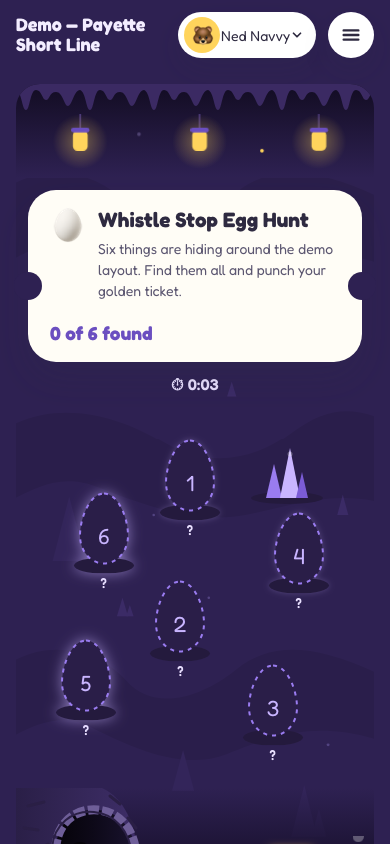
- They tap the hunt tile and enter the cave: their ticket at the top, and one egg per item tucked at random spots around the cave floor. The spots are the same every visit.
- Tapping an egg opens the item sheet. Guests can reveal hints one at a time and tap Found it! to hatch the egg.
- Finding every item shows the finale, with the guest's name, the golden ticket and an air horn.
- Start over clears the ticket, after a confirmation, so they can play again. It's on the ticket and on the finale.
Things to know
- Layout actions need the DEJA server. A find or the finale only fires an effect, turnout, signal, or sound while the DEJA server is attached to your layout. Without it, the guest's ticket still punches and the hunt plays on, but nothing happens on the layout.
- Each find fires once, while the server stays up. A double tap or a repeat post does not run the action twice (a server restart forgets what it has already fired), and events that sit queued while the server is offline are dropped once they go stale instead of replaying.
- Progress lives on the phone. A guest's ticket is stored in that browser, not in Firebase. It survives a reload, but clearing site data or switching phones starts a fresh ticket.
- Regenerating the Room Code ends visits. Guests see "Your visit has ended" on their next action. Rejoining with the new code restores the same ticket.
- Reduced motion is respected. Guests who prefer reduced motion get the punch without the confetti.