
Sounds
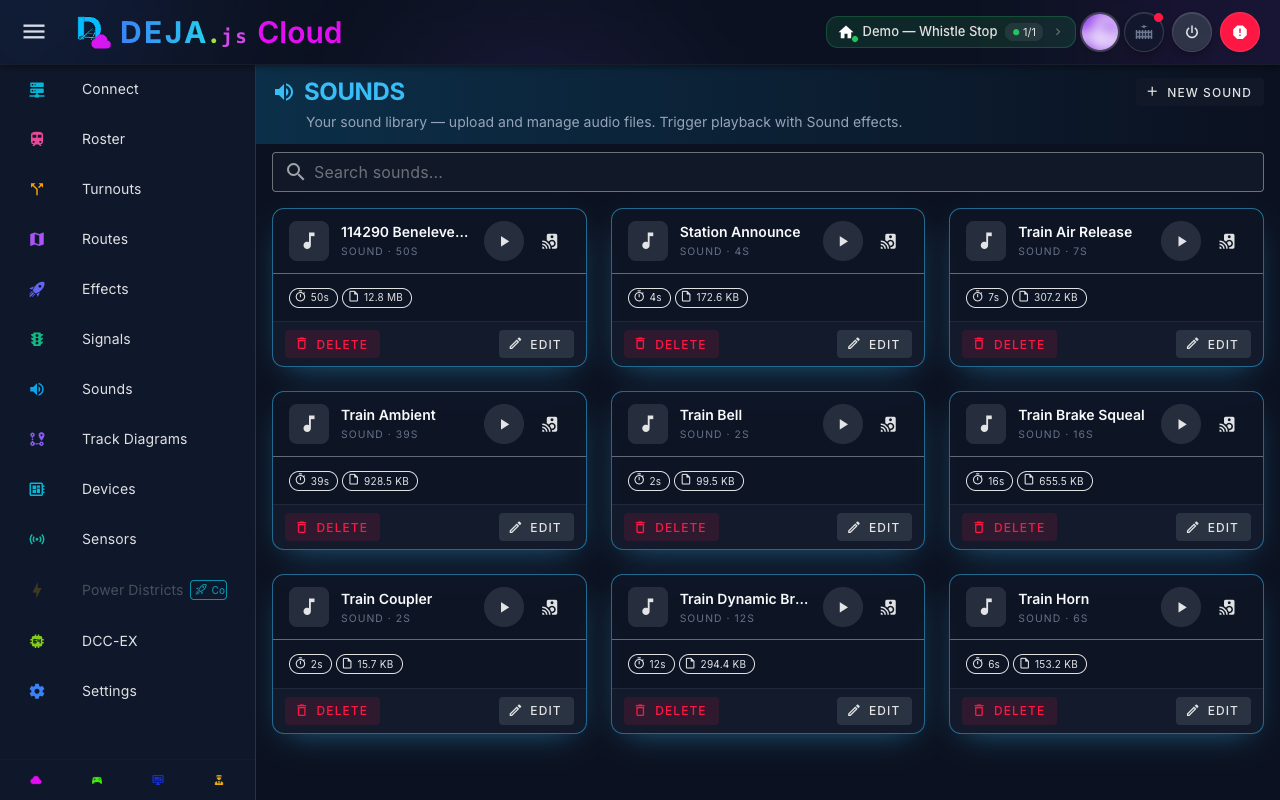
DEJA.js has one shared sound library — horn blasts, bells, ambient loops, and station announcements that every layout can play. Playing sounds happens on the layout; managing the library is for DEJA.js admins.
Playing Sounds
- Effects → Sounds tab -- The Effects page's Sounds tab lists the whole library grouped by category, with tap-to-play and a stop-all control. It's shown to the layout owner.
- Speed dial -- Default software sound buttons on the throttle's function speed dial play directly from the library.
Playback is instant -- there's no "sound effect" to create first. Tap play and your DEJA Server plays (or stops) the audio through its speakers right away.
Sound Library (admins)
The Sound Library page (/sounds/manage) manages the shared library. It's available to DEJA.js admins only, and changes apply to every layout.
Files are grouped by category, derived from the file's folder (for example sounds/horns/ or sounds/ambient/). For each file you can:
- Preview -- The play/stop button previews the file in your browser.
- Play on layout server -- Pushes the file to your running DEJA Server so it plays through the server's speakers (layout owners).
- Delete -- Removes the file from the library for every layout. This does not affect anything already playing.
New Sound uploads a file into a category so it groups sensibly in the library and on the Sounds tab. Old /sounds links open the Effects page, and /sounds/new opens the library.